

How to Bypass Geo-Blocking for Free: Complete Guide (2026)


How many times have you tried to watch a movie on Netflix, only to find out it “isn’t available in your region”? Or started a series at home… then landed in another country and watched it vanish from your watchlist?
That’s geo-blocking. It’s when a website or app limits what you can see (or whether you can use it at all) based on where you appear to be located. It hits streaming services, news sites, social platforms, online gambling, and even banking or government portals that refuse logins from outside your home country.
The good news: you can bypass these geo-restrictions with a VPN and other methods. This guide breaks down how geo-blocking works, why it exists, and the step-by-step methods you can use to unblock websites and access the content you’re paying for. Ready?
What Is Geo-Blocking?
So what is geo-blocking? The definition is simple: geo-blocking, also known as geo-restriction, is the practice of restricting access to websites, content, or services based on your geographic location.
In practical terms, it means that when you visit a website or open an app, it checks where you’re connecting from (usually based on your actual IP address) and decides what you’re allowed to see or whether you’re allowed in at all.
You’ve probably run into it without realizing. Netflix libraries change by country (Netflix US isn’t the same as Netflix UK). Sports streams can be blacked out in your area, even if you pay for the service. Gambling sites often only work in regions where they’re licensed. Some news sites show different articles, prices, or paywalls depending on where you live. The same happens on gaming storefronts — the regional Xbox store and Xbox Game Pass library differ dramatically between countries. And in certain countries, like China or Iran, entire social media platforms can be blocked.
The weird part is that the internet feels global, but access is often local. Your location ends up deciding what you can watch, read, or use.
Why Does Geo-Blocking Exist?
There are many reasons why geo-blocking exists, just like there are many reasons why passports, borders, and visas exist. When you travel, you might need a visa to enter a country, and the rules change depending on where you’re from.
The internet works in a similar way. Geo-blocking is basically a website saying, “We only let people in from certain places.” Your digital passport is your IP address, and websites can see it when you show up.
In more real-world terms, geo-restrictions exist mostly because of licensing agreements.
Streaming platforms like Netflix don’t own most of their content outright. Instead, they buy the rights to show specific movies and shows in specific countries. A movie that’s licensed to Netflix in the United States might be licensed to a different network in the UK, or not licensed for streaming in Poland at all. That’s why your streaming library changes when you travel.
Another reason why geo-restrictions exist is government regulations. Some countries require certain content to be blocked (gambling, adult content, political content). Financial services can also be restricted by sanctions or local laws. VPNs themselves are restricted in some places (like China and Russia).
Then there are business reasons: price discrimination (software and services can cost different amounts in different countries), market segmentation (some companies don’t want to support users everywhere), and fraud prevention (blocking traffic from regions that are statistically higher risk).
So geo-blocking isn’t always just Netflix being difficult. Like visas, it’s usually tied to legal, regulatory, or business rules.
How Do Websites Know Your Location?
When you knock on a website’s door, it knows exactly which country you’re coming to visit it from, which is what triggers geo-blocks. But how do websites know your real location?
IP Address (Primary Method)
Every device connected to the internet uses an IP address, which is basically the public ID your network uses to talk to the rest of the web. That IP address is typically assigned by your Internet Service Provider (ISP), and blocks of IPs are registered and mapped to specific countries (and often cities or regions).
So when you open a website, the site can see your actual IP, run a quick lookup in an IP geolocation database, and make a decision: “allowed,” “not available in your region,” or “here’s the version of the site for your country.”
This is the most common location signal websites rely on, and it’s the main one VPNs solve. A VPN service routes your traffic through a server in another country, giving you that server’s IP address to override your actual location. This way, you can access geo-restricted content, with a different IP address than your actual one, from wherever you are.
GPS Data (Mobile Devices)
On phones and tablets, apps can also use GPS location data, which is far more precise than an IP address. Instead of estimating where you are based on your internet connection, GPS can pinpoint your real physical location, but only if you give the app permission through Location Services (iOS/Android).
Some streaming and sports apps use GPS as a secondary check. So even if your IP address makes it look like you’re in another country, the app may compare it to your GPS location and block you if they don’t match. This is one reason geo-blocking can be trickier to bypass on mobile apps than in a browser.
Payment Method
Some services don’t just look at your location. They also look at how you pay. Credit cards are tied to a billing address and a bank, and many platforms can tell what country your card was issued in.
That means even if you use a VPN to change your IP address, a service might still block you (or force you into a specific region) if your payment method doesn’t match. For example, a site may only allow sign-ups with cards issued in the same country where the account is being created.
A VPN can’t change where your credit card is registered. It only changes how your internet traffic appears, not the country attached to your billing info.
Browser Data
Even if a website can’t use GPS, your browser still leaks a few “soft” location clues. Your timezone is a big one. It can hint at your general region, especially if it doesn’t line up with where your IP address claims you are. Language preferences can also give you away (for example, a browser set to a certain language often suggests where the user is based).
Some sites use these signals as extra checks. If your IP says “London” but your browser timezone says “Los Angeles,” that mismatch can be enough to trigger a geo-block or a “please verify your location” prompt.
Methods to Bypass Geo-Blocking
The geo-blocking fix usually comes down to one thing: changing (or disguising) the location signals a website uses to identify where you're coming from. Here are the most common options, what they do well, and where they fall short.
VPN (Virtual Private Network)
The best way to bypass geo-restrictions and access geo-blocked content is to use a VPN service. It works by connecting your device to a server in another country and routing your internet traffic through that server. Websites then see the VPN server’s IP address, not yours, so it looks like you’re browsing from the server’s location.
A VPN works for all internet traffic, encrypts your connection, and works across pretty much every device. The trade-offs are that it usually requires installing an app, it can slightly reduce speeds, and it won’t always work on every platform because some services actively block known VPN IP addresses.
Smart DNS
Smart DNS is the “lightweight” option to a VPN service. It’s faster than a VPN, but less versatile. Instead of routing all your traffic through another country, it reroutes only the DNS requests that can give away your location. That can be enough to get past certain geo-restrictions without the overhead of full VPN encryption.
It’s often faster than a VPN because there’s no encryption slowing things down, and it’s great for devices that don’t support VPN apps (like some smart TVs and game consoles). The downside is that it doesn’t hide your real IP address, it doesn’t encrypt anything (so it’s not private), it doesn’t work for every service, and it’s generally easier for platforms to detect and block.
Proxy Servers
A proxy is the basic “middleman” approach. It routes your browser traffic through another server, which can mask your IP address and geographical location for web browsing.
Proxies are often free and can be used without installing software (especially web-based proxies). But they’re limited: most only work in the browser (not apps), many free proxies are slow and unreliable, they usually don’t encrypt your traffic, and streaming platforms block a lot of known proxy servers.
Tor Browser
Tor is built for anonymity, not streaming. It routes your traffic through multiple volunteer-run servers (called “nodes”) to make tracking you much harder. It can sometimes help you access blocked content, but it’s not designed as a geo-unblocking tool.
Tor is free and offers strong privacy. The trade-off is speed: it’s typically extremely slow, exit node locations are limited, and most major streaming platforms block Tor traffic outright, so it’s usually a bad pick for geo-blocking unless your goal is maximum privacy, not Netflix.
How to Bypass Geo-Blocking With Windscribe
If you want the simplest “flip a switch and it works” way to bypass geo-restrictions, a VPN provider is usually it. Windscribe changes your IP address by routing your traffic through a server in another country, so websites see you as being in that location instead of your real one. Here’s how to do it in a few minutes.
Step 1: Download Windscribe
Install Windscribe on the device you’ll be using to access the content. It’s available on Windows, macOS, Linux, iOS, and Android. We also have a free plan (up to 10GB/month) so you can test our apps before committing.
Step 2: Choose Your Server Location
Open Windscribe and pull up the server list. Pick a country where the content you want is available. For example, if you want a US-only streaming library, connect to a US server. This will override your device's IP address and give you a US one.
A few quick tips:
-
Servers labeled Windflix are optimized for streaming.
-
If one server doesn’t work, try another server in the same country.
-
If you have multiple options, choosing a closer server usually means better speeds.
Step 3: Connect and Verify
Tap or click Connect. Your IP address changes immediately once the connection is active. To double-check, visit a free IP checker like ours and confirm it shows the country you selected.
To stream content from a geo-restricted site, first of all, you will need to know which country the content is geo-restricted to. For example, if you want to watch The Office (US), it is currently only available on Netflix Canada, so this is what you should do:
- Open the Windscribe app on your device.
- Select Canada from the server list and connect to one of the Canadian locations.
- Once the VPN is connected, open the Netflix website or Netflix app.
- Select the content you want to stream.
It is as simple as that for most of the major streaming sites, including geo-restricted sites. Sometimes you will need to restart the streaming app or close and re-open the streaming website's tab in order to fully reload it.
Step 4: Streaming In-Browser? Do This
If you're streaming in-browser, we encourage you try our browser extension for added success. Once you've downloaded and installed the extension, try the following settings:
- Ensure all location services are disabled in your browser
- In the browser extension, open the Privacy tab (shield icon in the top right corner)
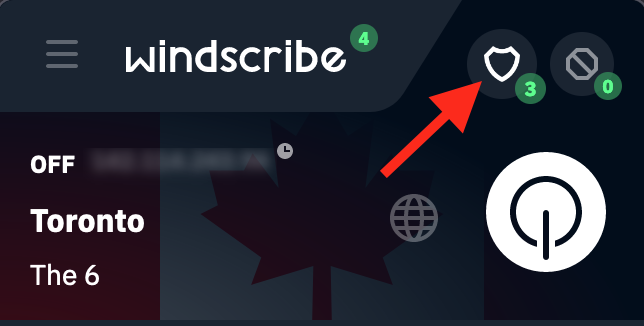
- Enable the following settings (blue = on): Location Warp, Time Warp, and Language Warp
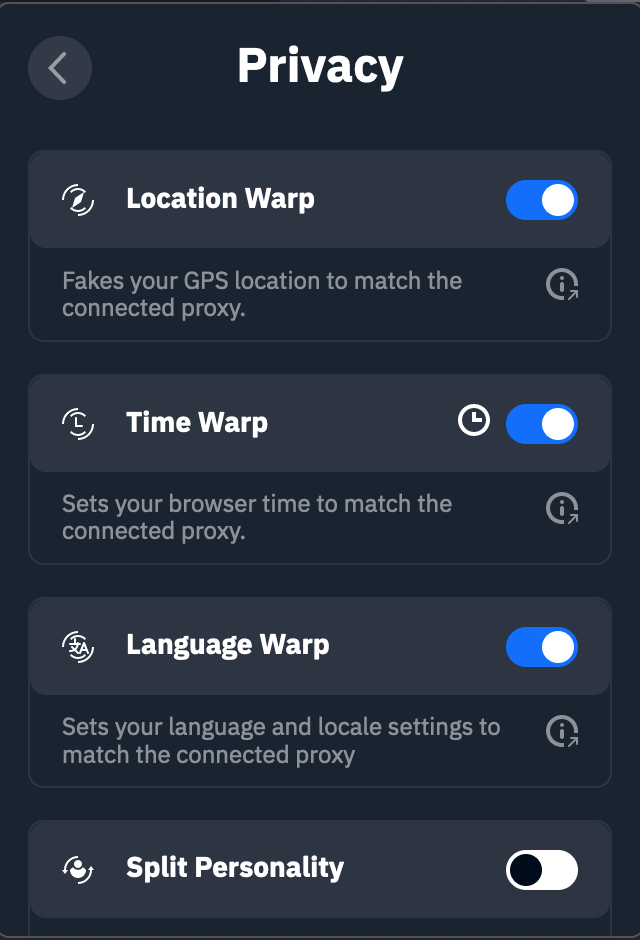
- Clear your browser cache.
- Connect to the appropriate Windscribe location.
- Head to the website you want to stream.
Step 5: Access Your Content
Now open the streaming service, website, or app you wanted to use. You should see the version of the site (and content library) for the region you picked.
If it still doesn’t work:
-
Clear your browser cookies/cache (streaming sites love remembering your old region).
-
Try a different server in the same country.
-
Restart the streaming app (mobile) or refresh the page (browser).
-
Make sure your real location isn’t leaking (we’ll cover that in the troubleshooting section).
Common Use Cases
You can use a VPN like Windscribe to unblock all kinds of services, not just streaming sites (although that’s what you probably came here for). Here are some scenarios where geo-blocking might get in your way, and how Windscribe (or whatever VPN you choose) can help.
Streaming Services
Using a VPN provider for streaming can help you access your usual Netflix library while traveling, or watch shows and movies that are available in other countries but not yours on platforms like Netflix, Hulu, Disney+, and more. It can also help you get around region locks on services that are tied to a single country.
Changing your location through a VPN can also help with regional sports blackouts. If a game is blocked in your area because of local broadcasting rights, connecting through a server in a different region may let you stream it like normal.
Gambling and Betting Sites
Some gambling and betting sites only work in certain regions because of local licensing and gambling laws. If you travel, you might suddenly get blocked from logging in or placing bets. You can use a VPN to unlock them, but remember that you’re still responsible for complying with local gambling laws wherever you are.
These sites are also usually more aggressive about VPN detection than streaming platforms. Windscribe gives you multiple servers to try if one gets flagged.
Social Media and Messaging
Some countries block access to social media and messaging platforms like Facebook, Instagram, WhatsApp, or Telegram. For example, these services are banned in China and Iran, and heavily restricted in the UAE. If you live in or travel to places with stricter censorship, a VPN can help you unlock these apps.
These countries often block (or frown upon) VPN usage as well, but Windscribe offers a Stealth mode to bypass heavy censorship and VPN restrictions.
News and Information
Certain websites, like news sites for instance, often have paywalls that only allow a limited number of free articles per region. A VPN can sometimes help you get around those limits by switching your location and accessing the site from different regions. Some news sites are also blocked entirely in certain areas, and changing your VPN location can help you reach them.
You can also change your VPN location to research without as much regional bias in your search results, since what you see can vary depending on where you appear to be browsing from.
Gaming
A VPN can help with gaming geo-restrictions too, like accessing region-locked games or DLC, and connecting to servers in other countries to play with friends abroad. In some cases, it can also help you get around geographic pricing differences (though many stores still verify your account region and payment method).
What Geo-Blocking Bypasses Can't Solve
Although a VPN like Windscribe can mask your location and give you an IP address from virtually any region to bypass geo-blocks, there are still a few things it can’t realistically override.
Payment Verification
Some services require a subscription that you pay for with a credit card, and they can see exactly where that card was issued. A VPN can’t change the billing country tied to your card, and that often determines which region your subscription is based in.
That said, with streaming services like Netflix, Disney+, or BBC iPlayer, you can still access different country libraries by switching your VPN location, even if your billing country stays the same.
Phone Number Verification
Similarly, some services (like banking and government platforms) require a local phone number for SMS verification (though that’s becoming rarer by the day). So if you signed up for a Polish bank account with a Polish phone number, you may still need that same number to verify logins, even if you’re in Thailand.
A VPN can make it look like you’re still in Poland, but it won’t replace the need for that local phone number. If you can’t access it for any reason, you may not be able to log in, even with a VPN.
ID Verification
Some gambling or financial services require a government ID from specific countries. This means that even if you use a VPN to appear in the “right” region, the service may still reject you if your identity documents don’t match what they’re allowed (or licensed) to accept. A VPN can change your IP address, but it can’t change where you’re actually registered as a person.
Employer/School Networks
If you’re on a managed network (like at work or school), your organization may block VPN connections entirely. In that case, the VPN isn’t failing. It’s being actively blocked by the network you’re on.
In summary, a VPN solves IP-based geo-blocking. It doesn’t create fake identities or bypass payment or identity verification, and it can’t override restrictions enforced by your employer or school’s network policies.
Frequently Asked Questions
Does Windscribe work with Netflix?


Can I use a free VPN to bypass geo-blocking?
Why does my VPN work for some sites but not others?
Is geo-blocking the same as censorship?
Will my internet speed be slower with a VPN?
What if I need help with a specific platform?
Conclusion: Can a VPN Bypass Geo-Blocking?
Absolutely. Geo-blocking restricts content based on location, but it’s not unbeatable. A VPN overrides your real location by routing your traffic through its servers and giving you an IP address from a different country, so websites think you’re somewhere else. If you’re in Bangkok and want to access a site that only works in Australia, you can connect to an Australian server and browse like you’re there.
However, some sites may also use GPS (on mobile) and browser data like cookies, timezone, and language to double-check your region. That’s why Windscribe goes beyond a basic VPN, with a browser extension that can help align those signals with the location you’re connected to for more reliable unblocking.
Download Windscribe and take it for a test drive with our free plan (10GB/month). Questions? Contact support or visit r/Windscribe.